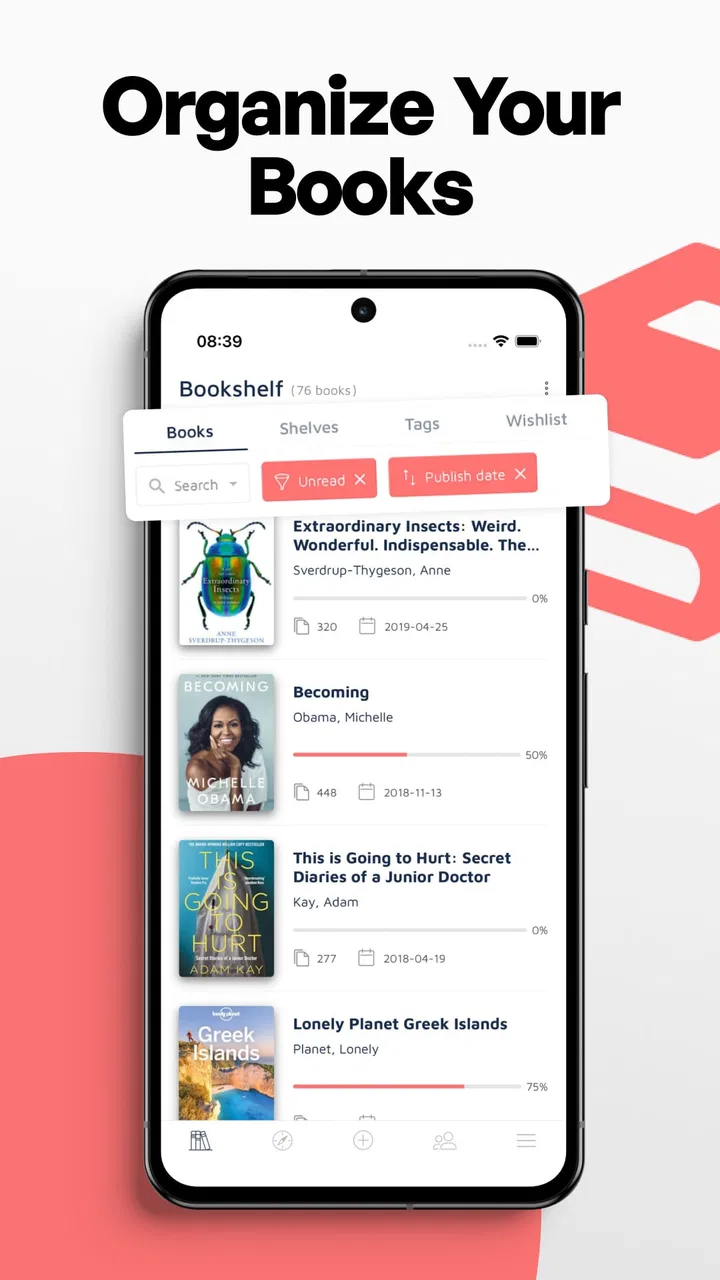
Bookshelf-Your virtual library
- 4.6
- Rating
- 1.00M
- Installs
- Free
- Price

 Analysis by App-foxy
I approached Bookshelf as a practical library companion rather than an ebook reader, and that distinction shaped my whole experience. It is designed for people who want to keep track of what they own, decide what to read next, set personal reading goals, and share progress with others. It does not replace Kindle, Google Play Books, Apple Books, or another app used to open and read digital pages. Its job is organization.
That narrow purpose is also its strongest argument. If your books are spread across shelves, boxes, wish lists, and half-finished notes, a dedicated catalog can make your reading life easier without trying to become a complete reading platform. If you only read one ebook at a time and never care about tracking a collection, this may feel like an extra step. My recommendation depends less on how many books you read and more on whether you enjoy having a clear view of your reading habits.
How I judged Bookshelf as a library organizer
The first decision is whether you need a book tracking app at all. A phone note can hold a short list, and a spreadsheet can record almost anything. Those alternatives are flexible, but they also require you to design the system yourself. Bookshelf makes more sense when you want a purpose-built place for your collection, reading plans, and progress instead of maintaining columns and labels manually.
You May Also Like

 Blood Strike: 2.5 Anniversary
Blood Strike’s Loadouts Turn Every Drop Into a Tactical Gamble
A close look at Blood Strike’s custom loadouts: how fast access to signature weapons reshapes its battle royale rhythm, rewards preparation, and narrows the gap between fights.

 Pandora - Music & Podcasts
Pandora’s Music Is Easy to Start, but Harder to Recover
Pandora’s strength is its low-effort path from a seed to a station. Its weak spot is how much confidence it asks you to place in connection, setup, and quiet recovery.

 8 Ball Pool
 Is Built on Rivalries, Rematches, and Routine
A close look at the rivalries, rematches, shared routines, and unanswered safety questions that turn a quick pool match into a persistent mobile community.

 Samsung Music
’s Quiet Strength Is Playing What You Already Own
Its reach comes less from spectacle than from dependable access to a personal library. That simplicity is both the app’s strongest retention engine and its ceiling.

 AccuWeather: Weather Radar
AccuWeather Review: A Quick, Clear Forecast for Everyday Decisions
For everyday plans, the best forecast is the one you can understand quickly. AccuWeather makes rain timing, radar, and local conditions easy to act on, with a few trade-offs.

 Hill Climb Racing
Why Hill Climb Racing Still Turns Crashes Into One More Run
A tiny car, a bumpy hill and one more upgrade: Hill Climb Racing keeps resurfacing because its simple chaos makes every near-miss feel personal.
More From Our News Desk



I also looked at how well the app separates different intentions. “Books I own,” “books I want to read,” and “books I am currently reading” are not the same list, even though basic note-taking tools often mix them together. A useful library organizer should help me answer simple questions quickly: What do I have? What should I start next? Which titles have I already finished? That structure is more valuable than a long list of decorative options.
Another important criterion is whether the app supports a realistic routine. I do not want to spend more time maintaining a catalog than reading. The best workflow is one I can update after buying a book, when starting a new title, or at the end of a reading session. Bookshelf is most appealing when those small updates help me make decisions later, rather than becoming a hobby of their own.
The app belongs to the Books & Reference category and comes from SquidBit. It is free to install, with optional in-app purchases ranging from $2.49 to $79.99 per item. That pricing range is worth noticing before committing to a large catalog, because the free starting point is attractive, while the value of paid options depends on how deeply you plan to use the organizer.
A useful distinction between reading and tracking
The wording around the product can be misunderstood if you expect pages, highlighting, or audio playback. Bookshelf is not a reading app in that sense. I would pair it with whatever service or physical shelf already contains the actual books. This makes it complementary to ebook readers rather than a direct replacement for them.
That separation can be surprisingly helpful. I can keep a single overview of paper books and digital titles instead of relying on separate reading platforms. A physical novel on my nightstand and an ebook on my phone can belong to the same personal plan, even though they are opened in completely different places. For readers whose collections cross formats, that is a more useful role than another app that only handles one kind of file.
It also prevents a common disappointment: installing it expecting immediate access to reading material. I would make that expectation clear to anyone I recommended it to. The benefit comes from visibility and planning, not from supplying books or replacing a bookstore account.
Where Bookshelf earns a place on my phone
The strongest part of the experience is the idea of turning a loose collection into a manageable personal library. Instead of remembering which books I own or keeping a mental list of recommendations, I can use the app as a reference point. This is especially useful after moving, reorganizing shelves, lending books, or discovering that I have bought several titles in the same subject without noticing.
Reading goals add another layer. I do not see goals as a competition with other readers; I find them more useful as a gentle planning tool. A target can encourage me to choose a shorter book during a busy month or reserve time for a longer one when my schedule is calmer. The important benefit is not the number itself, but the moment when a vague intention becomes a visible plan.
One practical workflow is to create a “next three” shortlist rather than trying to decide from the entire collection every time. I can keep the broader library intact while choosing a small group for the current season. That reduces decision fatigue. When I finish one title, I already have a direction, but I am not locked into a rigid queue.
A second useful workflow is separating ownership from intention. A book I own may not be a book I want to read soon. Keeping those ideas apart prevents my collection from becoming a guilt list. I can acknowledge that a title is on my shelf without pretending it belongs in this month’s plan. For readers who buy faster than they read, this distinction is more valuable than a simple “read” counter.
Sharing progress gives the app a social angle without making the whole experience dependent on a social network. I can use progress as a conversation starter with friends, compare reading plans informally, or let someone know what I am working through. I would still choose this app primarily for personal organization, but sharing can make goals feel less isolated.
The app’s public standing also suggests that this concept has broad appeal: it has an average rating of 4.6 from around 19 thousand ratings, and it has passed one million installs. Those figures do not guarantee that every reader will enjoy the workflow, but they do indicate that the basic idea has reached a substantial audience.
Small habits that make the organizer more useful
I would not try to catalog an entire shelf in one sitting unless I genuinely enjoyed that project. A better approach is to begin with books I am likely to read, lend, or search for soon. Once the habit feels natural, I can add older titles gradually. This avoids the common trap of spending an afternoon building a perfect library and then abandoning it because maintenance feels like work.
I would also review goals when circumstances change. A target set during a quiet holiday may be unrealistic during a demanding work period. Adjusting the plan is not failure; it keeps the organizer connected to real life. In my view, a flexible goal is more useful than an ambitious one that turns every missed week into discouragement.
For a household with shared shelves, I would treat the app as a personal catalog unless everyone agrees on one system. Mixing several people’s books can make recommendations and progress harder to interpret. A personal library remains clearer, while shared ownership can be noted through an agreed convention rather than assumed.
Another non-obvious benefit is using the collection as a filter for future purchases. Before buying a book that looks interesting, I can check whether I already own a similar unread title or whether the new purchase would simply enlarge an untouched pile. The app cannot make the decision for me, but a visible catalog creates a pause between impulse and checkout.
What the free starting point means in practice
Because the app is free, it is easy to test without treating the first installation as a major commitment. I would spend a few days entering a representative sample rather than judging it from an empty screen. The question is whether the act of organizing produces useful answers after the initial setup.
The optional purchases deserve a measured approach. A reader with a small, stable collection may be perfectly satisfied without spending anything. Someone who wants a more extensive personal system should examine which paid functions are relevant before assuming that every upgrade is necessary. The presence of items priced from $2.49 up to $79.99 means I would avoid tapping through on autopilot and would first decide what problem I am trying to solve.
For families, students, or younger readers, the Everyone content rating makes the app broadly approachable. It is suitable as a neutral organizing tool rather than something limited to a particular age group. Parents may still want to agree on how children record goals, especially if progress tracking starts to feel like pressure instead of encouragement.
Where another kind of app may fit better
The most obvious alternative is a dedicated ebook reader. If my priority is opening books, syncing a current page, adjusting typography, or listening to purchased content, I need the platform that delivers those functions. Bookshelf does not compete with that category on its own terms. I would use it alongside a reader only if I wanted one broader view of physical and digital books.
A bookstore ecosystem can be better for someone who wants purchasing, downloads, and reading in one place. The trade-off is that such services may naturally focus on titles obtained through that store. Bookshelf is more appealing when my collection comes from different sources or includes physical books, but it adds the responsibility of keeping my catalog current.
Goodreads-style social platforms may suit readers who primarily want reviews, public discussion, and a large community. Bookshelf’s emphasis is more personal and practical: organizing a library, setting goals, and showing progress. I would choose a community-centered service when other readers’ opinions are the main reason I am tracking books. I would choose Bookshelf when I want my own shelves and plans to remain the center of attention.
A spreadsheet remains the strongest alternative for people who want complete control. I can create custom fields for edition, purchase location, lending history, condition, or resale value. That flexibility is hard to beat. The cost is setup and maintenance. Bookshelf is the better fit when I want a ready-made book-focused workflow; a spreadsheet is better when my catalog behaves more like an archive or inventory database.
Paper notes can still win for a very small collection. If I only need a handful of reminders, installing and updating a separate app may be unnecessary. The advantage appears when the list grows, changes frequently, or needs to connect with reading goals. In other words, Bookshelf is not automatically better than a note; it becomes better when the structure saves me repeated effort.
The friction of moving an existing collection
The biggest switching cost is not money but time. Anyone with a large shelf has to decide how much information is worth entering. I would begin with titles currently owned and unread, then add completed books only if past progress matters to me. This creates a useful working library quickly instead of delaying the benefit until every old title is recorded.
Keeping two systems can also create confusion. If I continue using a spreadsheet, a paper journal, and Bookshelf at the same time, none of them may stay accurate. I would choose one as the main record and use the others only for temporary notes. The app is most useful when it becomes the place I check before making a reading or buying decision.
There is also a mental cost to overtracking. Recording every page or setting an aggressive target can turn a relaxing activity into administration. I would use the simplest level that changes my behavior for the better. If a feature makes me think about data entry more than books, it is probably not earning its place in my routine.
Device compatibility is straightforward for many users because the app requires Android 7.0 or later. The current version is 1.19.17, so I would check the operating system on an older phone before planning a full migration. That is a practical detail, particularly for readers who keep an older device as a dedicated reading or household catalog unit.
Who should skip it
I would skip Bookshelf if I want an all-in-one reading service, because the organizer role will not replace the app where my books are actually opened. I would also skip it if I dislike maintaining lists and have no interest in goals or progress. A catalog that is never updated becomes another abandoned screen, regardless of how appealing the idea sounds.
Readers with highly specialized cataloging needs may prefer a customizable database or spreadsheet. If I need detailed edition records, lending transactions, condition notes, or unusual classification rules, a general-purpose tool may give me more control. Bookshelf is aimed at everyday reading organization, not at replacing a librarian’s archival system.
Finally, I would be cautious if social sharing makes reading feel performative. Sharing progress can be motivating for some people, but private goals may be healthier for others. The app can support either attitude, provided I use it as a personal aid rather than a scoreboard.
My recommendation after using it as a decision tool
I recommend Bookshelf to readers who want a clearer relationship with their collections, especially those who combine physical books with titles from different digital services. Its value is not that it does everything; its value is that it focuses on the gap between owning a book and actually deciding what to do with it.
I would start with a small, useful catalog, create a modest reading goal, and test whether the app helps me choose more confidently. I would not pay for extras immediately, and I would not enter every historical title before seeing a benefit. That approach keeps the trial low-pressure and makes the decision based on daily usefulness rather than the excitement of a new tracking system.
For me, the clearest sign that it is working would be simple: when I finish a book, I should know what I might read next without searching several shelves or apps. If the catalog helps with that, the free installation is worth exploring. If I only want to read and never organize, a normal ebook reader, bookstore app, or even a short note will probably be the better choice.
Bookshelf is a focused Books & Reference app from SquidBit, released on May 16, 2019, and available to an Everyone audience. Its 4.6 average and broad install base make it easy to take seriously, but the final choice should come from your habits rather than popularity. Choose it when organization is the missing part of your reading life, not when you are looking for another place to open books.
FAQs for Bookshelf-Your virtual library
01What is Bookshelf-Your Virtual Library and how does it work?
Bookshelf-Your Virtual Library is a powerful app designed to help you manage and catalogue your personal book collection. It allows users to add books by scanning barcodes, searching by title, or entering details manually. The app provides a digital space to organize, track, and explore your library from your device.
02Can I access my book collection offline with Bookshelf?
Yes, Bookshelf-Your Virtual Library offers offline access, allowing you to view your entire book collection without an internet connection. This feature ensures you can always manage your library, even in areas with limited connectivity or while traveling.
03Does Bookshelf support exporting my library data?
Absolutely, Bookshelf allows users to export their library data in various formats such as CSV and PDF. This feature is particularly useful for backing up your collection, sharing with friends, or transferring your library to a different platform or device.
04How does Bookshelf handle book recommendations?
Bookshelf provides personalized book recommendations based on your reading preferences and history. By analyzing your library and reading habits, the app suggests titles you might enjoy, helping you discover new authors and genres tailored to your interests.
05Is Bookshelf-Your Virtual Library available for both Android and iOS devices?
Yes, Bookshelf-Your Virtual Library is available for download on both Android and iOS platforms. This ensures compatibility with a wide range of devices, allowing you to seamlessly manage your library whether you're using a smartphone or tablet.
Pros
- User-friendly interface for easy navigation.
- Extensive collection of genres available.
- Offline access to downloaded books.
- Personalized recommendations enhance discovery.
- Syncs across multiple devices seamlessly.
Cons
- Limited audiobook selection available.
- Some features require a premium subscription.
- Occasional app crashes on older devices.
- In-app ads can be distracting for some users.
- Initial setup can be time-consuming.

Bookshelf-Your virtual library
Gallery